Data exploration and semi-automated quality control#
Exploring your data properly is an important step for deciding which cells to include to your atlas. Based on insights gathered from analysing the data pre integration, you can determine the quality of each input dataset, as well as the data completeness of metadata and features. If the quality of a dataset is not sufficient for the atlas you are planning to build, you might want to consider excluding that dataset from the study. This also applies to cases where metadata is missing and/or not obtainable, or whenever important genes are missing from the datasets.
Install dependencies#
For this workflow, make sure you install the following environments:
envs/scanpy.yamlenvs/qc.yamlforqcanddoubletsmodules
Configuring a basic QC workflow#
Cell-level quality control can tell you about the quality of the data due to experimental conditions.
Even for published studies, where you would usually obtain already filtered data, you would want to investigate the QC thresholds that the authors have chosen.
In the following is an example on test data for setting up a first iteration of QC plots.
Start creating a config file called configs/qc/qc_config.yaml (see example under configs):
output_dir: data/out
images: images
user_gpu: false

DATASETS:

  example_qc_analysis:
    input:
      qc:
        test1--split_data_value=1: data/pbmc68k.h5ad
        test1--split_data_value=2: data/pbmc68k.h5ad
        test1--split_data_value=3: data/pbmc68k.h5ad
        test1--split_data_value=4: data/pbmc68k.h5ad
        test2--split_data_value=1: data/pbmc68k.h5ad
        test2--split_data_value=2: data/pbmc68k.h5ad
        test2--split_data_value=3: data/pbmc68k.h5ad
        test--split_data_value=empty: workflow/qc/test/input/empty.zarr
      merge: qc
    qc:
      counts: X  # raw counts slot
      hue: # obs columns you want in your plot
        - bulk_labels
        - batch
        - phase
      thresholds:
        test2--split_data_value=1:
          n_counts_max: 500
          n_genes_min: 200
          percent_mito_max: 0.5
      thresholds_file: configs/qc/user_thresholds.tsv
Call the pipeline with either your runner script (e. g. called configs/qc/run.sh)
bash configs/qc/run.sh qc_all -nq
You should get the following dry-run output:
Using profile .profiles/local for setting default command line arguments.
WARNING: Duplicated columns: {'metric': ['methods', 'metrics']}
Building DAG of jobs...
Job stats:
job                    count
-------------------  -------
qc_all                     1
qc_autoqc                  8
qc_get_thresholds          8
qc_merge_thresholds        1
qc_plot_joint              8
qc_plot_removed            8
qc_plot_summary            1
total                     35
Execute the QC workflow as follows:
bash configs/qc/run.sh qc_all -c2
This will estimate QC thresholds using the sctk’s scAutoQC function.
Output#
Check the outputs under images/qc.
$ ls images/qc/dataset\~example_qc_analysis/

file_id~test--split_data_value=empty
file_id~test1--split_data_value=1
file_id~test1--split_data_value=2
file_id~test1--split_data_value=3
file_id~test1--split_data_value=4
file_id~test2--split_data_value=1
file_id~test2--split_data_value=2
file_id~test2--split_data_value=3
qc_stats.tsv
summary
thresholds.tsv
There are per dataset and per file outputs.
The thresholds.tsv contains the estimated thresholds for both input files test1 and test2, while qc_stats.tsv contains the overall statistics of cells that passed or failed the QC thresholds.
file_id	passed	failed	ambiguous
test1--split_data_value=1	249	451	0
test1--split_data_value=2	249	451	0
test1--split_data_value=3	17	683	0
test1--split_data_value=4	0	700	0
test2--split_data_value=1	0	700	0
test2--split_data_value=2	0	700	0
test2--split_data_value=3	0	700	0
test--split_data_value=empty	0	0	0
dataset	file_id	threshold_type	passed_frac	removed_frac	n_passed	n_removed	n_total	percent_mito_min	percent_mito_max	n_genes_min	n_genes_max	n_counts_min	n_counts_max
example_qc_analysis	test1--split_data_value=1	sctk_autoqc	0.0	1.0	0	700	700	0.0	0.1076309010386467	762.8945922851562	764.9998168945312	1886.2825927734373	2086.372802734375
example_qc_analysis	test1--split_data_value=1	user	0.0	1.0	0	700	700	0.0	10.0	200.0		250.0
example_qc_analysis	test1--split_data_value=1	alternative	0.0	1.0	0	700	700
example_qc_analysis	test1--split_data_value=1	updated	0.3557142857142857	0.6442857142857142	249	451	700	0.0	10.0	200.0	764.9998168945312	250.0	2086.372802734375
example_qc_analysis	test1--split_data_value=2	sctk_autoqc	0.0	1.0	0	700	700	0.0	0.1076309010386467	762.8945922851562	764.9998168945312	1886.2825927734373	2086.372802734375
example_qc_analysis	test1--split_data_value=2	user	0.0	1.0	0	700	700	0.0	15.0	200.0		50.0
example_qc_analysis	test1--split_data_value=2	alternative	0.0	1.0	0	700	700
example_qc_analysis	test1--split_data_value=2	updated	0.3557142857142857	0.6442857142857142	249	451	700	0.0	15.0	200.0	764.9998168945312	50.0	2086.372802734375
example_qc_analysis	test1--split_data_value=3	sctk_autoqc	0.0	1.0	0	700	700	0.0	0.1076309010386467	762.8945922851562	764.9998168945312	1886.2825927734373	2086.372802734375
example_qc_analysis	test1--split_data_value=3	user	0.0	1.0	0	700	700	0.0	10.0	300.0		50.0
example_qc_analysis	test1--split_data_value=3	alternative	0.0	1.0	0	700	700
example_qc_analysis	test1--split_data_value=3	updated	0.0242857142857142	0.9757142857142858	17	683	700	0.0	10.0	300.0	764.9998168945312	50.0	2086.372802734375
example_qc_analysis	test1--split_data_value=4	sctk_autoqc	0.0	1.0	0	700	700	0.0	0.1076309010386467	762.8945922851562	764.9998168945312	1886.2825927734373	2086.372802734375
example_qc_analysis	test1--split_data_value=4	user	0.0	1.0	0	700	700
example_qc_analysis	test1--split_data_value=4	alternative	0.0	1.0	0	700	700
example_qc_analysis	test1--split_data_value=4	updated	0.0	1.0	0	700	700	0.0	0.1076309010386467	762.8945922851562	764.9998168945312	1886.2825927734373	2086.372802734375
example_qc_analysis	test2--split_data_value=1	sctk_autoqc	0.0	1.0	0	700	700	0.0	0.1076309010386467	762.8945922851562	764.9998168945312	1886.2825927734373	2086.372802734375
example_qc_analysis	test2--split_data_value=1	user	0.0	1.0	0	700	700		0.5	200.0			500.0
example_qc_analysis	test2--split_data_value=1	alternative	0.0	1.0	0	700	700
example_qc_analysis	test2--split_data_value=1	updated	0.0	1.0	0	700	700	0.0	0.5	200.0	764.9998168945312	1886.2825927734373	500.0
example_qc_analysis	test2--split_data_value=2	sctk_autoqc	0.0	1.0	0	700	700	0.0	0.1076309010386467	762.8945922851562	764.9998168945312	1886.2825927734373	2086.372802734375
example_qc_analysis	test2--split_data_value=2	user	0.0	1.0	0	700	700
example_qc_analysis	test2--split_data_value=2	alternative	0.0	1.0	0	700	700
example_qc_analysis	test2--split_data_value=2	updated	0.0	1.0	0	700	700	0.0	0.1076309010386467	762.8945922851562	764.9998168945312	1886.2825927734373	2086.372802734375
example_qc_analysis	test2--split_data_value=3	sctk_autoqc	0.0	1.0	0	700	700	0.0	0.1076309010386467	762.8945922851562	764.9998168945312	1886.2825927734373	2086.372802734375
example_qc_analysis	test2--split_data_value=3	user	0.0	1.0	0	700	700
example_qc_analysis	test2--split_data_value=3	alternative	0.0	1.0	0	700	700
example_qc_analysis	test2--split_data_value=3	updated	0.0	1.0	0	700	700	0.0	0.1076309010386467	762.8945922851562	764.9998168945312	1886.2825927734373	2086.372802734375
example_qc_analysis	test--split_data_value=empty	sctk_autoqc	0.0	0.0	0	0	0
example_qc_analysis	test--split_data_value=empty	user	0.0	0.0	0	0	0
example_qc_analysis	test--split_data_value=empty	alternative	0.0	0.0	0	0	0
example_qc_analysis	test--split_data_value=empty	updated	0.0	0.0	0	0	0
There are also separate outputs per original input file and split, which contains per file_id threshold files as well as joint_plots and removed directories.
Joint plots#
$ ls images/qc/dataset~example_qc_analysis/file_id~test1--split_data_value=1/

joint_plots  qc_stats.tsv  removed  thresholds.tsv
$ ls images/qc/dataset\~example_qc_analysis/file_id\~test1--split_data_value=1/joint_plots

'hue=batch.svg'  'hue=bulk_labels.svg'  'hue=phase.svg'  'hue=qc_status.svg'
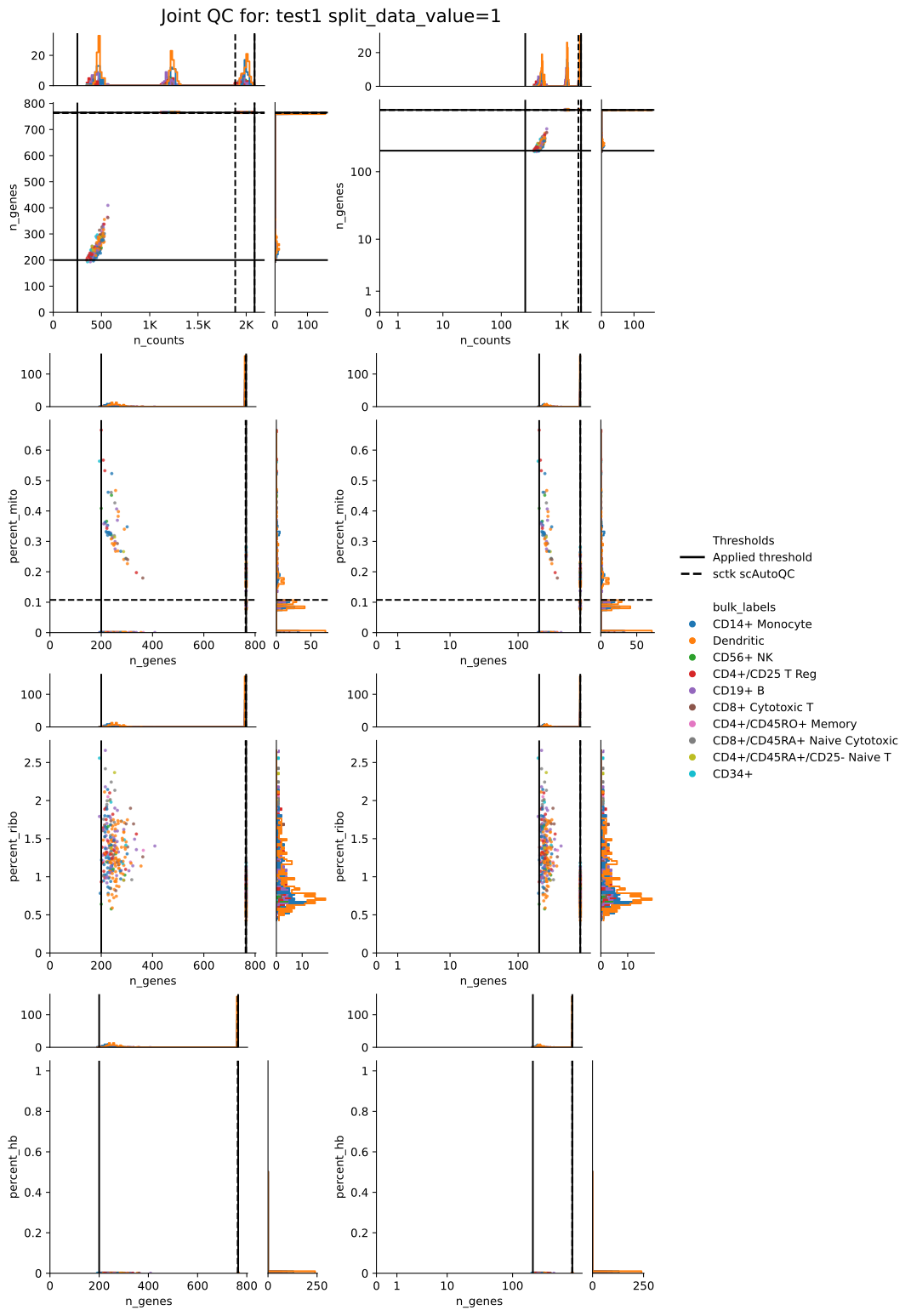
Each scatter plot output is now a single SVG file containing all configured QC metric pairs, with linear-scale and log-scale panels arranged side by side.
The workflow writes one scatter plot per configured hue and always adds hue=qc_status.svg.
If no valid hue columns are available, the workflow writes main.svg instead of hue-specific scatter plots.
The density plots are also combined into a single density.svg file rather than separate files per metric pair.
Example outputs are shown below:
Removed plots#
The removed directory contains the QC summary plots for the same file_id:
$ ls images/qc/dataset\~example_qc_analysis/file_id\~test1--split_data_value=1/removed

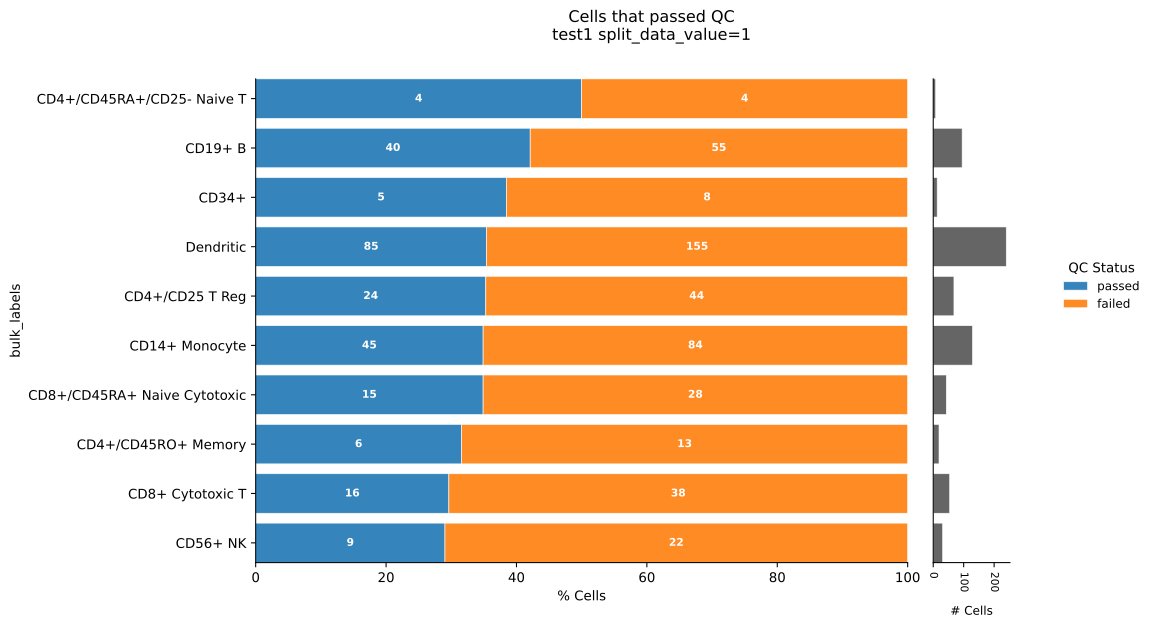
'by=batch.svg'  'by=bulk_labels.svg'  'by=phase.svg'   cells_passed_all.svg   per_metric_violin.svg
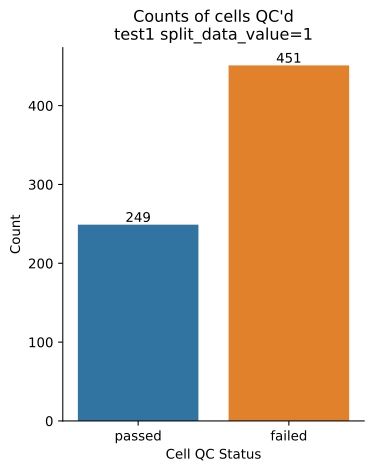
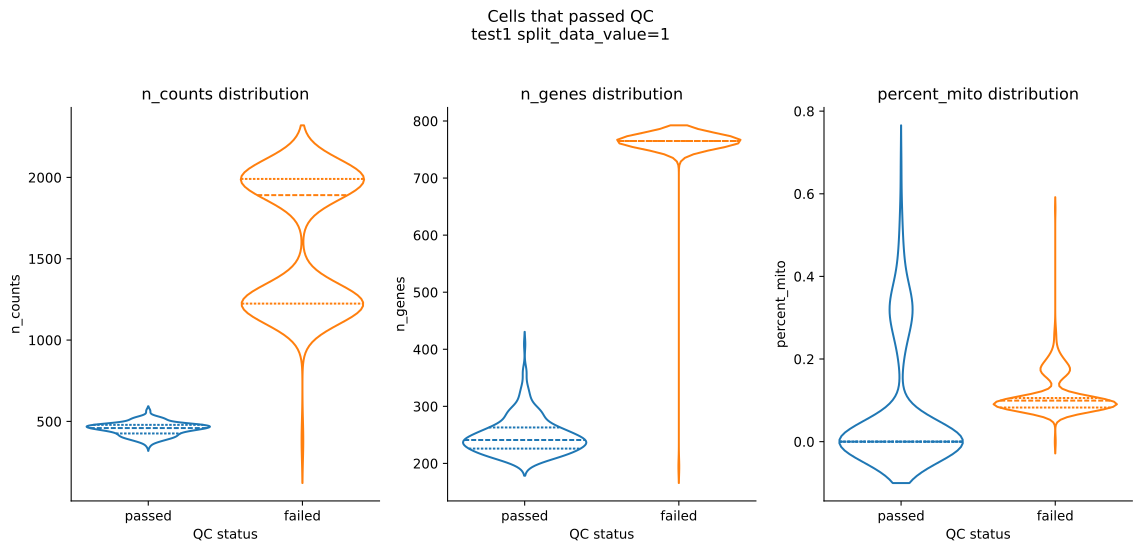
The by={hue}.svg plots summarise removed cells per annotation, cells_passed_all.svg shows the overall QC status counts, and per_metric_violin.svg shows the per-metric distributions split by QC status.
Example removed-plot outputs:
Summary plots#
The dataset-level summary directory aggregates QC behaviour across all files and splits.
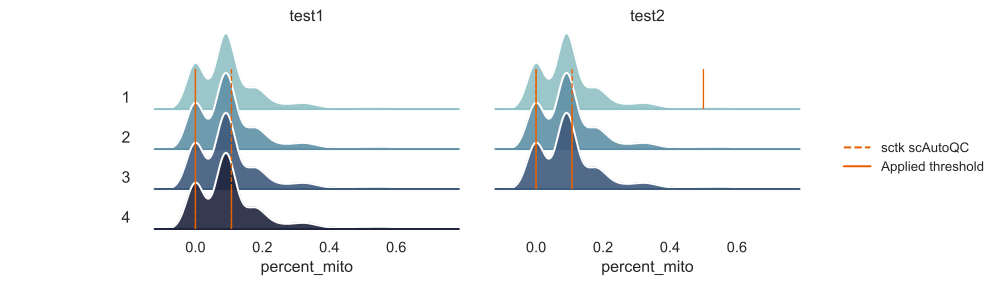
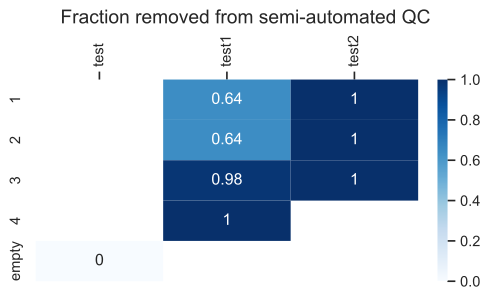
It contains removed-cell heatmaps and ridge plots for each configured QC metric.
$ ls images/qc/dataset\~example_qc_analysis/summary

n_removed_heatmap.svg  removed_frac_heatmap.svg  ridge_plots
$ ls images/qc/dataset\~example_qc_analysis/summary/ridge_plots

log1p_n_counts.svg  log1p_n_genes.svg  n_counts.svg  n_genes.svg  percent_mito.svg
The ridge plots show the metric distributions per input file and split, with the configured thresholds overlaid. The heatmaps summarise absolute and relative cell removal across the dataset.
Full Configuration#
You can find the complete configuration file and runner script under configs/qc/.
Here’s the final workflow configuration:
output_dir: data/out
images: images
user_gpu: false

DATASETS:

  example_qc_analysis:
    input:
      qc:
        test1--split_data_value=1: data/pbmc68k.h5ad
        test1--split_data_value=2: data/pbmc68k.h5ad
        test1--split_data_value=3: data/pbmc68k.h5ad
        test1--split_data_value=4: data/pbmc68k.h5ad
        test2--split_data_value=1: data/pbmc68k.h5ad
        test2--split_data_value=2: data/pbmc68k.h5ad
        test2--split_data_value=3: data/pbmc68k.h5ad
        test--split_data_value=empty: workflow/qc/test/input/empty.zarr
      merge: qc
    qc:
      counts: X  # raw counts slot
      hue: # obs columns you want in your plot
        - bulk_labels
        - batch
        - phase
      thresholds:
        test2--split_data_value=1:
          n_counts_max: 500
          n_genes_min: 200
          percent_mito_max: 0.5
      thresholds_file: configs/qc/user_thresholds.tsv
#!/usr/bin/env bash
set -e -x

snakemake \
  --profile .profiles/local \
  --configfile \
    configs/qc/qc_config.yaml \
  --snakefile workflow/Snakefile \
  --use-conda \
  --rerun-incomplete \
  --keep-going \
  --printshellcmds \
    $@